
Video has always been one of our biggest customer acquisition channels at MindPal. We've been making videos consistently for years — long-form tutorials, short-form clips, user showcases, you name it. But if I'm being honest? The process was a mess.
Not the recording part. That was fine. The everything else part.
Over the past couple of weeks, I've been building an internal AI video agent system to fix that. It's been one of the most eye-opening, fun, and genuinely useful experiments I've done in a while — and a lot of people have been asking about the new videos we've been putting out. So I figured I'd write this up and share a bit of the behind-the-scenes, because the system has made our process more reliable, more consistent, and started driving significantly more views — and maybe it helps someone else too.
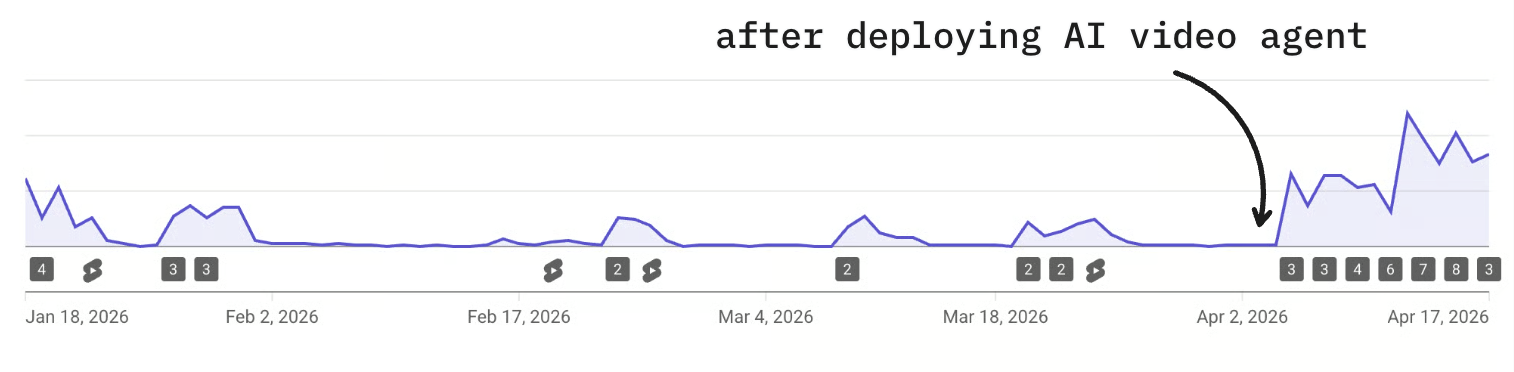
The Problem We Were Trying to Solve
We make two types of videos: long-form and short-form. Both had different problems.
For long-form content, the biggest time sink was always post-production. We had already automated the obvious stuff — titles, video descriptions, social media posts, email blasts. AI is great at text tasks. But actually editing the video? That was still brutal.
We don't have an in-house video editor. We tried hiring a freelancer at one point, but here's the thing — our videos are really context-heavy. They involve a lot of product knowledge, AI industry knowledge, very specific stuff about what we build. Finding someone with that depth and video editing skills at a reasonable price is genuinely hard. So we ended up editing ourselves. And even if the editing doesn't take forever, doing something you don't enjoy is just draining. The team was burning energy on it.
The dream was simple: take raw footage — a recording I did, a user interview, a podcast — and turn it into a publish-ready video. Cut filler, structure it properly, add visuals, timestamps, intro, outro. All of that, without me touching a timeline.
For short-form, the problem was different. We've been using AI avatars (HeyGen) for a while now. Short-form for us is purely top-of-funnel — brand awareness, not conversion. We had some videos pull tens of thousands of views, which showed the format worked. But every video was still manually written and manually uploaded. Because it depended on humans showing up consistently, it was unreliable. Some days we were in the zone. Other days we were buried in product work, customer support, or just tired. We never cracked the code on making it reliable.
The third problem was the one I was most skeptical about: product footage. A lot of our videos require actual screen recordings — opening the app, running through an AI workflow, demonstrating features. And crucially, it's never a fixed script. Every template we demo is different. The clicks are different. The inputs are different. For a long time, that felt impossible to automate.
The Lightbulb Moment
At some point I started genuinely questioning my assumptions. Was product footage actually impossible to automate? Especially given how fast AI coding agents had been evolving?
I brought it to Claude. Described the kinds of videos we make — opening the app, walking through a workflow template, showing a demo run, adding a call to action. And I asked: is there any chance this could be automated?
Claude said yes.
I wasn't totally sure where this was going, but I just started flowing. I asked the agent to tackle it step by step: navigate to the workflow page, record the screen with human-like cursor movements, think of mock inputs to enter, scroll to view results, zoom out for a bird's-eye view of the full workflow, then zoom in on each node.
What happened next genuinely surprised me. Claude used Playwright — a browser automation framework — to record the screen. First pass had no visible cursor, so I asked it to add one. I literally just dropped in an SVG of a Mac cursor and told it to make the movement feel natural. It added randomized micro-movements. It looked like a human was using the app.
Challenge one: done. And honestly, that was the biggest mental blocker. Once I saw that the product footage could be automated, the rest clicked into place pretty fast — HeyGen for the avatar, Remotion for programmatic video editing (I'd played with it before so I knew what it could do), Whisper running locally for captions with word-level highlighting, and the social media scheduler's API to publish everything directly without any manual downloads or uploads. I also wired up Railway's native storage bucket to save all the product footage into a reusable library for future videos.
One video, end-to-end, done by an AI agent.
This is one of the template videos the system can make on its own. It’s the clearest example of the machine working exactly the way I hoped it would.
Turning One Video into a System
After that first proof of concept, the next step was generalizing. I exported all the chats from that first build, fed them back in as context, and said: we have hundreds of templates pending. Build this into a repeatable system.
What I didn't do — and this felt like a meaningful shift in how I approach these projects — was spend a ton of time upfront designing the architecture. I didn't dictate the file structure or the tools. I just shared context: here's what our video system looks like, here's an example of a good video, here's what I want the outcome to be, and here's where this will run (my Mac mini, Hermes agent, cron job). The agent figured out a solid architecture from there.
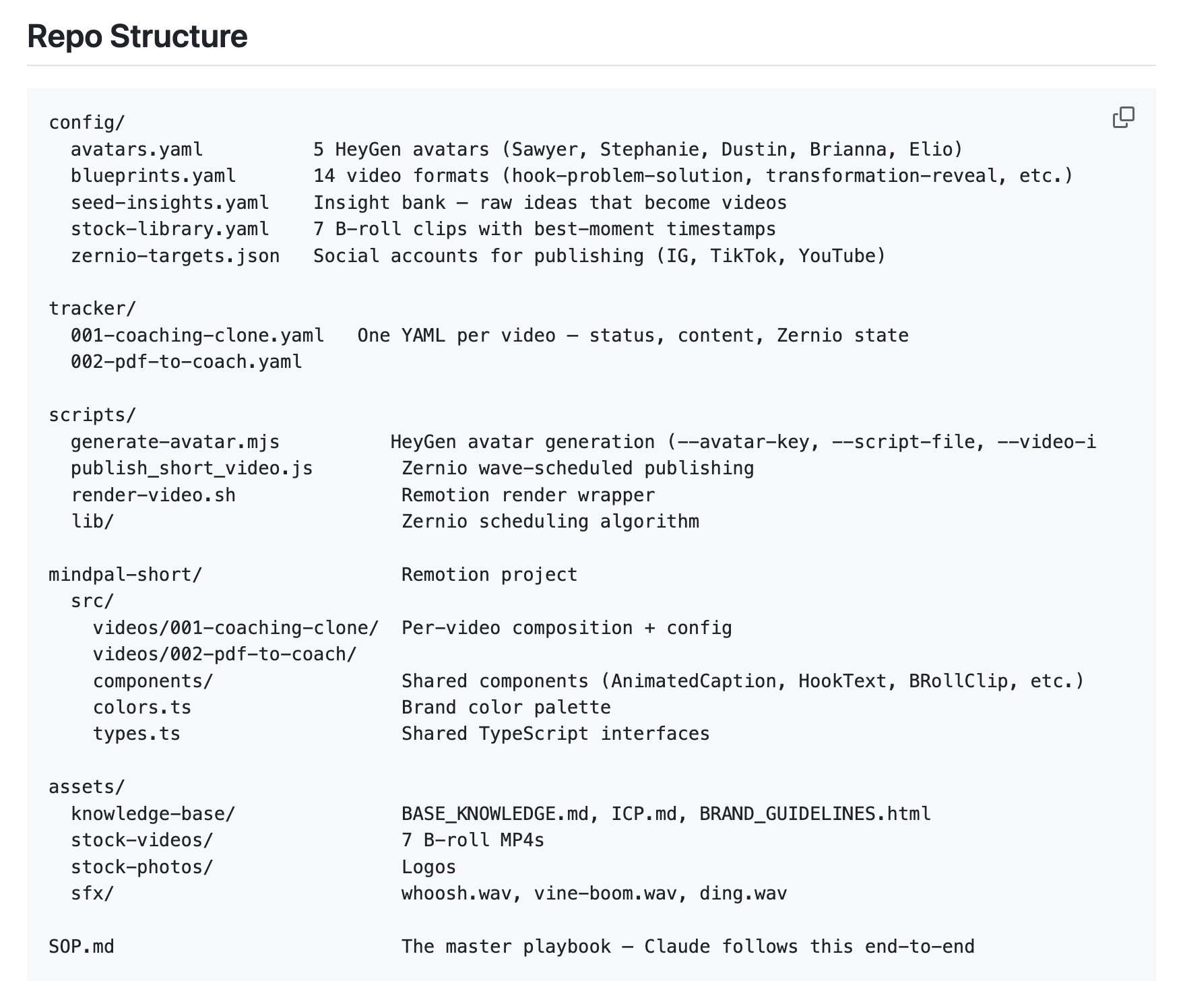
After the initial setup, I battle-tested it with two more templates. Found some gaps, refined the SOP, and then loaded all our existing templates into the workspace. The agent checks daily for unused templates and makes a video about one. One video per day. Not bulk-scheduled — deliberately one at a time, so I have room to observe, iterate, and update the SOP as I learn what's working.
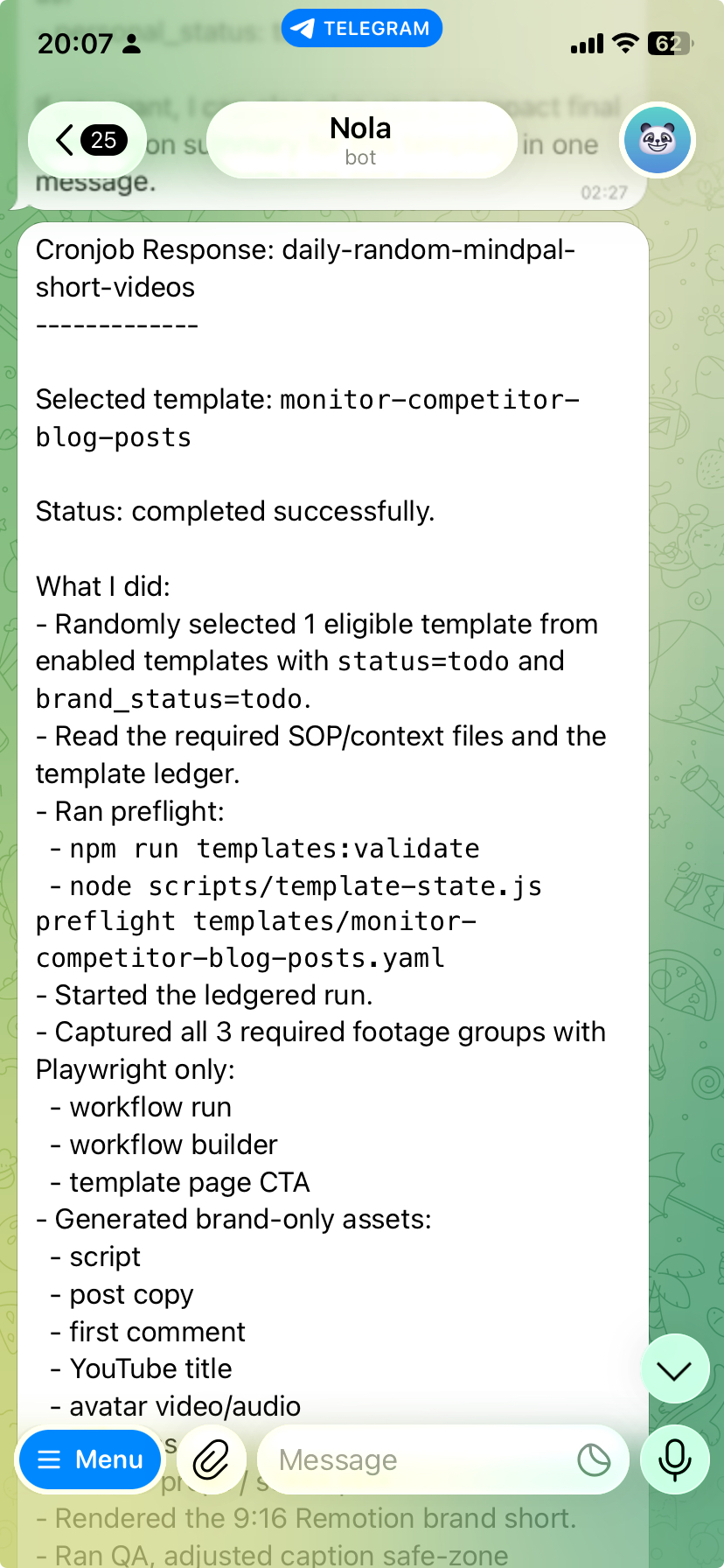
That iteration loop has already paid off. We noticed videos over a minute weren't performing well for shorts — tightened the scripts. We noticed posting identical videos across platforms didn't work — now the agent renders the same core content with different color schemes, fonts, and backgrounds per platform. We noticed showing the workflow run before the setup actually performs better (people see results first, then the how) — one SOP change, instantly applied to every future video.
This is the overall setup behind the scenes. Nothing fancy here, just the pieces that had to work together to make the whole thing reliable.
Expanding to Other Video Types
Once the AI template videos were running reliably, I started expanding the system to cover everything else we make.
Long-form clips. We do user showcase interviews — 20-minute conversations with power users showing how they use MindPal. Great content, but we wanted to maximize reach by cutting highlights into shorts. We tried Veed.io's clip feature. It was genuinely bad — chunks that made no sense, not self-contained, not useful. So I built the same kind of environment for this. Upload the raw recordings (separate files for each webcam and the screen share), give the AI requirements on what makes a good clip, and let it go. The results were significantly better. It can mix and match layouts, add edits in the same pass, and publish directly through the API without me ever downloading anything.
This is the kind of clip we wanted but never got from the usual auto-clipping tools. Short, self-contained, and actually worth watching.
Brand promo shorts. These are the trend-and-insight videos — not always tied to a specific template, but sharing an angle on how to use the product, or a take on something happening in AI. This type has two tracks: time-sensitive trend content (publish fast, ride the wave) and evergreen insights (pulled from sales calls, community conversations, customer interactions). The agent handles both. It can source logos, screenshots of articles, icons, and visuals from the web and pick the right pre-recorded product clips from the library. It matches sound effects. It writes and renders diagrams as code directly in the video. My whole team — including engineers with zero video editing experience — can just open Telegram, tell the Hermes agent what to make, and a reasonably good video comes out the other end.
This is a good example of the news-driven brand promo format. It lets us move fast on an angle without turning the whole process into chaos.
Personal channel shorts. This one's more personal. I post on LinkedIn a lot — tips, observations, ideas. Those posts are already a content library. This video type takes ideas I've already put into the world and amplifies them through video. Same system, just my avatar, my voice, my content.
This is the same system pointed at my personal content. Same engine, different voice, which is exactly what I wanted.
Long-form video. For this one, we're not automating volume — we're automating the drudgery. I set up a folder with MindPal's brand guidelines and product context preloaded. When I have a new raw recording, I drop it in and the AI edits it: cuts filler words, silences, and mistakes; rearranges the layout if I've got multiple webcams and a screen share; adds intros and outros; extracts a hook from the best moment of the interview. Then it pipes the finished video to our existing MindPal workflow to handle titles, descriptions, thumbnails, and social posts automatically. I'm not out of the loop — I'm just focusing on the high-level feedback and content quality instead of moving clips around a timeline.
This is where the system saves me the most energy. Not by replacing taste, but by taking a lot of the painful editing work off my plate.
What I Actually Learned About Building AI Agent Systems
Ten days in. These are the principles that stuck.
Context over control.
I'm not a video expert. I don't want to be. So I didn't try to dictate every single decision — the exact caption placement, the precise color tweaks, every individual edit. Instead, I gave the AI context: what MindPal is, who we're making videos for, what we have access to, what our brand looks like, what a good video feels like for us. Then I let it reason.
The difference is huge. AI is intelligent — it can think, make aesthetic judgments, come up with creative formats I wouldn't have thought of. When you over-specify, you cut off that upside. Instead of telling it how to do things, I focused on what it wouldn't know unless I told it — like the fact that product footage requires navigating to specific pages and performing specific actions, or that our workflow demos need to show the run result before the setup. That's the context that actually matters.
Context rot is real. Actively fight it.
The flip side of sharing context is over-sharing context. The more files, skills, memory entries, and tracking documents you accumulate in the agent's environment, the more noise you introduce. I make it a habit to review the AI's self-generated SOPs and skills regularly. If something is redundant, repeated, or over-emphasized, I cut it out. This is especially important as systems like Hermes auto-generate skills and memories on the fly — those auto-generated entries aren't always clean. Left unchecked, the environment bloats, and performance degrades.
Empowerment beats control.
I have a graphic design and video editing background. My team are engineers. In the past I had this (pretty unfair) expectation that they'd somehow be able to make videos to my standards. They couldn't. Now they can — because the system is designed to give them the input interface they're good at (talking to an AI, writing a prompt) and let the AI handle the output they're not trained for.
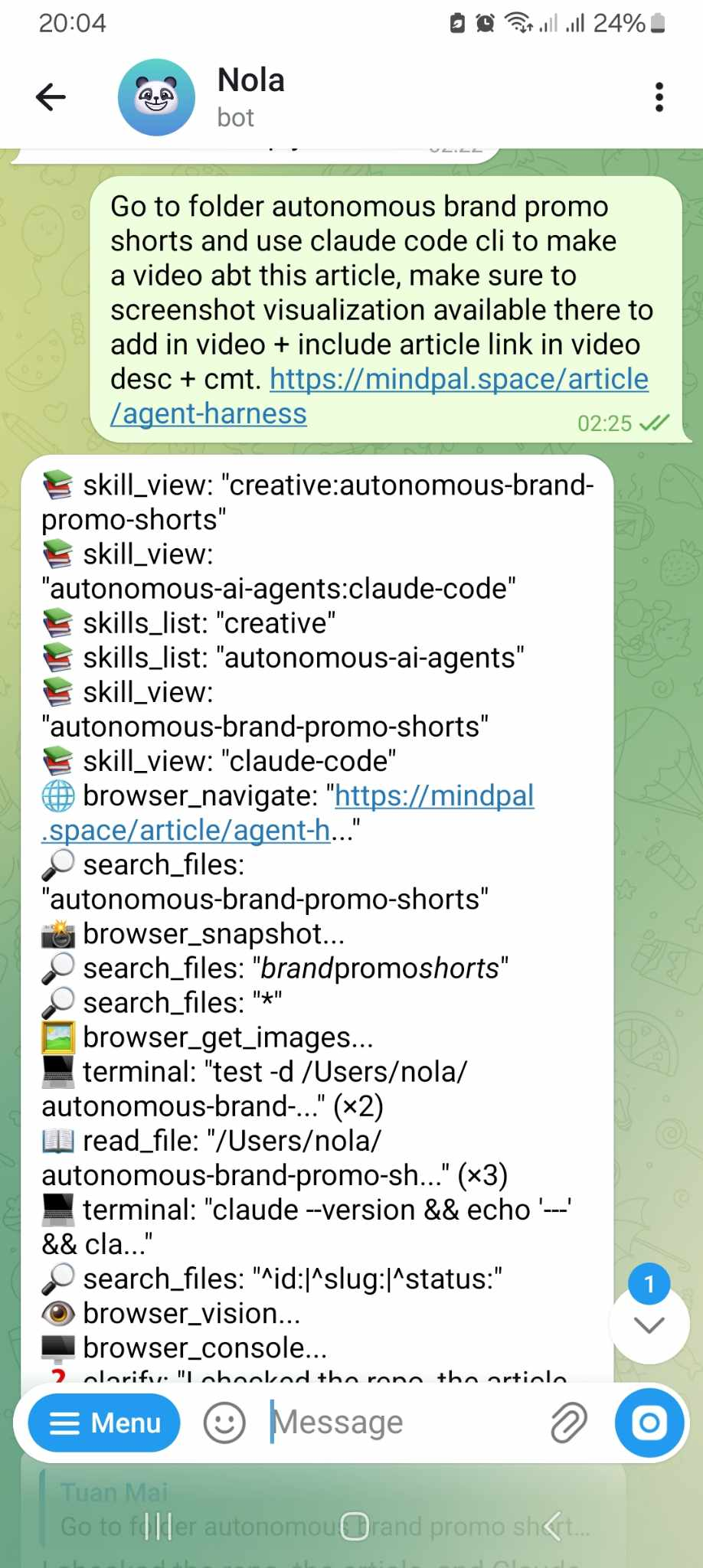
The same mindset applies to working with AI directly. Stop micromanaging individual design decisions. Load a solid brand guideline as foundational context and trust the AI to make the right individual choices. It saves back-and-forth, saves energy, and the output is better. Empowerment mindset over control mindset, every time.
Never forget the business goal.
This stuff is genuinely fun to build. The tech is cool, the systems are elegant, and it's easy to spend way too much time polishing things that don't move the needle. I've been deliberate about not doing that. Get the 20% that gives you 80% of the results out the door. Then improve from there. I'm running the short video system as-is for at least another week before expanding anything, because a short video is one piece of a much bigger go-to-market system and I don't want to over-index on it.
Don't scale AI slop.
This one's important to me. Automating video production is powerful. It's also a really easy way to flood the internet with garbage content. I'm not interested in that. Every video we make should be genuinely useful — an interesting use case, a new angle on something, a real insight people haven't thought about. Now that the editing is off my plate, I actually have more mental space to make the content better. That's the goal. Less time on moving elements around a timeline, more time on what I actually want to say.
What's Next
The system works. Ten days in, it's already turned something unreliable into something consistent. There's still a lot of room to improve, and I'm already thinking about the next iterations:
- Auto-sourcing content ideas — wiring up RSS feeds and Reddit APIs so the AI can surface AI news and trends on its own, without waiting for a human to find something worth covering.
- Analytics feedback loops — connecting the system to social media analytics APIs so the agent can learn from its own video performance over time and refine its approach.
- Continuous script and hook improvement — now that the core machine is running, improving the quality of individual components (hook, script, footage quality) becomes much easier because changes instantly propagate to every future video.
Long-form video is what I'm focused on next from a strategic standpoint. The editing side is handled, but building a solid planning and ideation process for genuinely good long-form content is where my energy is going.
Want to Build Something Like This for Your Company?
I want to keep pushing what's possible with AI when it comes to making videos. So I've decided to take on a small number of companies and help them build a custom AI video agent like this for their own business.
If video is already a big part of how your business grows — and you're already spending serious money on it (think $10k+/month on editors, agencies, or just your own team's time) — this is probably worth a conversation.
It's a $5,000 one-time thing. And I'll personally work with you on it.
Here's basically how it would go: we'd start with a call where I really get to understand your video system — what you make, how often, what's painful, what good looks like. From there I'd map it all out, build the agent and all the integrations end-to-end, and train your team on how to actually collaborate with it.
I'm only looking for the first 10 companies to do this with — partly to keep it manageable, partly because I want to actually do this well.
If that sounds interesting, book a call with me here. Would love to chat.